PYNQでLチカしてみる~Verilog&Chisel3~
これは備忘録です。かなり雑な書き方でメモります。
Verilog編
参考: Chisel + PYNQでLチカ(お正月FPGAあそび) - /home/tnishinaga/TechMEMO
- Xilinxの Vivado Design SUite - HLx Edition 2019.1 をダウンロードしてインストール
- 要アカウント登録
- インストールには40GBの空き容量が必要
- ダウンロードとインストールに5時間くらいかかった
- PYNQをPCに接続
- Lチカコードを書く
- ポート割り当て
- Bitstreamを生成
- ボード書き込み
- [PROGRAM AND DEBUG] - [Open Hardware Manager] - [Program Device] で書き込み先のボードをPYNQと指定し、書き込むファイル(自動で入力されているはず)を選択する
ポート割り当て
RTL を生成したあとに、IOポートと作成したモジュールのポートの対応関係を割り当てる。
[RTL ANALYSIS] タブをクリックし、 [Open Elaborated Design] タブの中にある [Schematic] をクリック。ウインドウ下部に [I/O Ports] のサブウインドウが表示されなかったら、メニューバーの [Window] - [I/O Ports] をクリック。
割り当ては各ポートの [Package Pin] フィールドをクリックした後、ポート名をタイプして行う。
Lチカコード
module blink(
    input clk,
    output [3:0] port_out
    );

parameter cnt_1sec = 27'd124999999;
reg [26:0] cnt = 27'd0;
reg onoff = 1'b1;

always @(posedge clk) begin
    if (cnt == cnt_1sec) begin
        cnt <= 27'd0;
        onoff <= ~onoff;
    end
    else begin
        cnt <= cnt + 27'd1;
    end
end

assign port_out = {onoff, onoff, onoff, onoff};

endmodule
assign out = {onoff, onoff, onoff, onoff} になっていて、出力ポートが宙ぶらりんになっていて、LEDが光らないというやらかしをした。
Verilog書いて、PYNQでLチカ出来た~…>_<… pic.twitter.com/vcZWZYB6dc
— 友利奈緒ちゃん (@K_atc) June 2, 2019
Chisel3編
2019/06/02 Chisel3
参考: Chisel + PYNQでLチカ(お正月FPGAあそび) - /home/tnishinaga/TechMEMO
- Chiselのテンプレート を
git clone - Blinkモジュールを追加
- ビルド →
Blink.vを生成 - Vivado でビルド → PYNQに書き込み【エラー発生で不可】
Blinkモジュールを追加
- Blink.scala でLチカを実装
- 入力のClock信号はVerilog生成時に自動追加されるので宣言不要
- BlinkMain.scala でVerilogコードを生成する
- ※本来はテストコードも書くファイルだが省略
/src/main/scala/blink/Blink.scala:
package blink

import chisel3._

class Blink extends Module {
  val io = IO(new Bundle {
    val portLed = Output(UInt(4.W))
  })

  val cnt1sec = RegInit(124999999.U(27.W))
  val cnt = RegInit(0.U(27.W))
  val onoff = RegInit(false.B)

  when(cnt === cnt1sec) {
    cnt := 0.U
    onoff := ~onoff
  } .otherwise {
    cnt := cnt + 1.U
  }

  io.portLed := onoff
}
/src/test/scala/blink/BlinkMain.scala:
package blink

import chisel3._

object BlinkMain extends App {
  chisel3.Driver.execute(args, () => new Blink)
}
ビルド
--target-dirは生成したファイルを格納するフォルダの場所。--top-nameはVerilogなど生成するファイルのbase nameを指定する。
$ sbt 'test:runMain blink.BlinkMain --target-dir build --top-name Blink'
[info] Loading settings from plugins.sbt ...
[info] Loading project definition from /***/chisel-pynq/chisel-template/project
[info] Loading settings from build.sbt ...
[info] Set current project to chisel-module-template (in build file:/***/chisel-pynq/chisel-template/)
[warn] Multiple main classes detected.  Run 'show discoveredMainClasses' to see the list
[info] Running blink.BlinkMain --target-dir build --top-name Blink
[info] [0.010] Elaborating design...
[info] [6.169] Done elaborating.
Total FIRRTL Compile Time: 1189.4 ms
[success] Total time: 29 s, completed Jun 2, 2019 7:51:56 AM

$ ls build
Blink.anno.json  Blink.fir  Blink.v
参考) Blink.v
module Blink( // @[:@3.2]
  input        clock, // @[:@4.4]
  input        reset, // @[:@5.4]
  output [3:0] io_portLed // @[:@6.4]
);
... snipped ...
Vivado でビルドしてみる
Implementationできなくて詰んだ。ナニコレ🤔 🤔 🤔
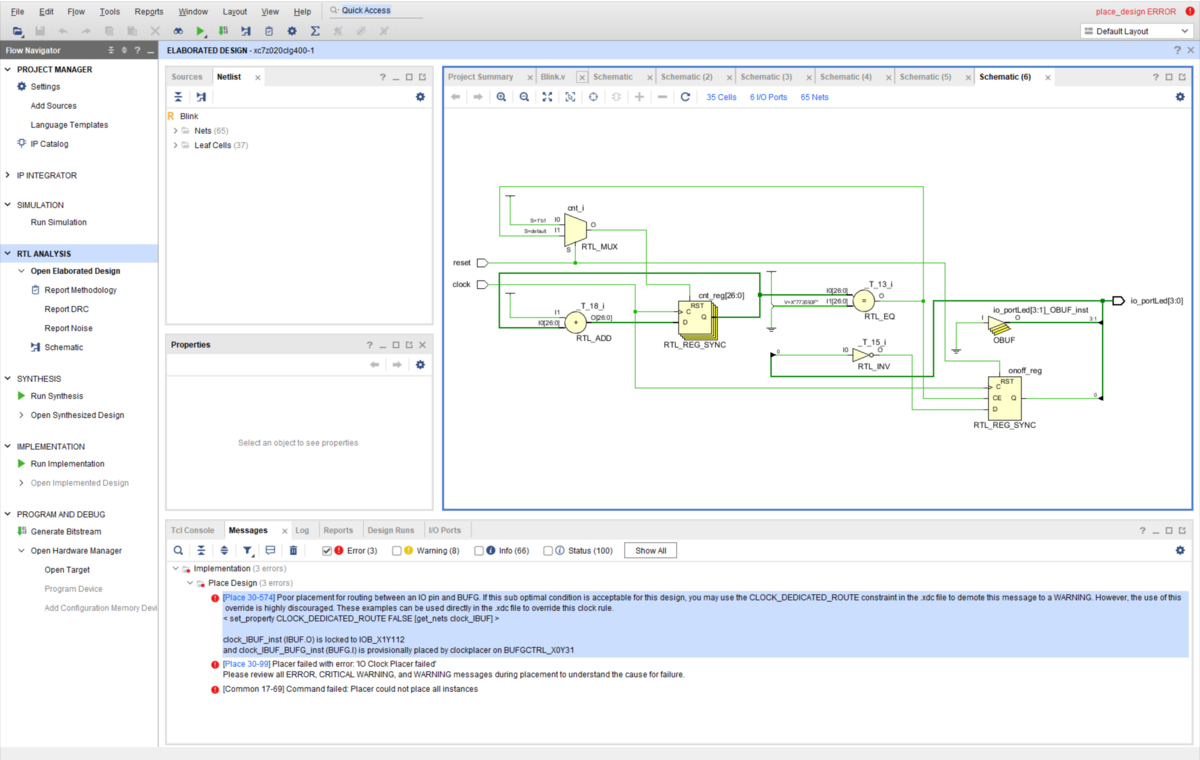
[Place 30-574] Poor placement for routing between an IO pin and BUFG. If this sub optimal condition is acceptable for this design, you may use the CLOCK_DEDICATED_ROUTE constraint in the .xdc file to demote this message to a WARNING. However, the use of this override is highly discouraged. These examples can be used directly in the .xdc file to override this clock rule.
    < set_property CLOCK_DEDICATED_ROUTE FALSE [get_nets clock_IBUF] >

    clock_IBUF_inst (IBUF.O) is locked to IOB_X1Y112
     and clock_IBUF_BUFG_inst (BUFG.I) is provisionally placed by clockplacer on BUFGCTRL_X0Y31
